Enter Only Numbers in Textbox using Javascript Example
When “Enter Only Numbers in Textbox using Javascript Example” moves through design, development and browser testing, this project guide can clarify hand-offs and time spent on revisions while leaving code quality, accessibility and released behaviour as the real measures of success.
For API changes, browser support and current usage patterns, compare the snippet with MDN Web Docs before adopting it in production.
Hi Dev,
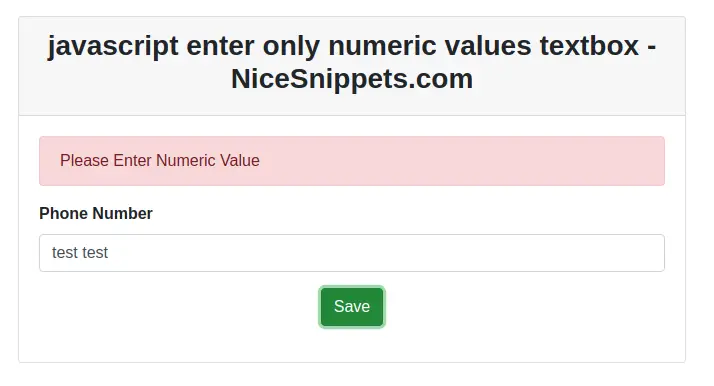
In this blog, I will explain you how to enter only numeric value in javascript. You want to allow only numeric values to be entered into the textbox.
You entered only numeric value not a string. If user enters alphabetic character it should warn the error. This textbox accept only numeric value.Here,I will give a full example which blocks all non numeric input from being entered into the text-field.
In this example i will use first example in isNaN() and second example in match pattern.
Example 1
<!DOCTYPE html>
<html>
<head>
    <title>enter only numbers in textbox using javascript example - nicesnippets.com</title>
    <link rel="stylesheet" href="https://cdnjs.cloudflare.com/ajax/libs/twitter-bootstrap/4.4.1/css/bootstrap.min.css" integrity="sha256-L/W5Wfqfa0sdBNIKN9cG6QA5F2qx4qICmU2VgLruv9Y=" crossorigin="anonymous" />
</head>
<body>
    <form>
        <div class="row mt-5">
            <div class="col-md-6 offset-3">
                <div class="card">
                    <div class="card-header">
                        <h3 class="text-center"><strong>Enter Only Numbers in Textbox using Javascript Example - NiceSnippets.com</strong></h3>
                    </div>
                    <div class="card-body">
                        <div class="alert alert-danger" id="alert" style="display: none;">Please Enter Numeric Value</div>
                        <div class="form-group">
                            <label><strong>Phone Number</strong></label>
                            <input type="text" name="num" placeholder="Enter Only Number..." id="num" class="form-control"\>
                        </div>
                        <div class="form-group text-center">
                            <button class="btn btn-success" onclick="getNameValue(event);">Save</button>
                        </div>
                    </div>
                </div>
            </div>
        </div>
    </form>
    <script type="text/javascript">
        function getNameValue(e){
            e.preventDefault();
            var num = document.getElementById("num").value;
            if (isNaN(num)) {
                document.getElementById("alert").style.display = "block";
                setTimeout(function(){
                    document.getElementById("alert").style.display = "none";
                }, 3000);
            }else{
                alert('is number');
            }


        }
    </script>
</body>
</html>
Example 2
<!DOCTYPE html>
<html>
<head>
    <title>enter only numbers in textbox using javascript example - nicesnippets.com</title>
    <link rel="stylesheet" href="https://cdnjs.cloudflare.com/ajax/libs/twitter-bootstrap/4.4.1/css/bootstrap.min.css" integrity="sha256-L/W5Wfqfa0sdBNIKN9cG6QA5F2qx4qICmU2VgLruv9Y=" crossorigin="anonymous" />
</head>
<body>
    <form>
        <div class="row mt-5">
            <div class="col-md-6 offset-3">
                <div class="card">
                    <div class="card-header">
                        <h3 class="text-center"><strong>Enter Only Numbers in Textbox using Javascript Example - NiceSnippets.com</strong></h3>
                    </div>
                    <div class="card-body">
                        <div class="alert alert-danger" id="alert" style="display: none;">Please Enter Numeric Value</div>
                        <div class="form-group">
                            <label><strong>Phone Number</strong></label>
                            <input type="text" name="num" placeholder="Enter Only Number..." id="num" class="form-control" onchange="getNameValue(event);">
                        </div>
                    </div>
                </div>
            </div>
        </div>
    </form>
    <script type="text/javascript">


        function getNameValue(e) {
            e.preventDefault();
            var num = document.getElementById("num").value;
            if (!num.match(/^\d+/)) {
                document.getElementById("alert").style.display = "block";
                setTimeout(function(){
                    document.getElementById("alert").style.display = "none";
                }, 3000);
            }else{
                alert('is number');
            }
        }
    </script>
</body>
</html>
It will help you....
- How to set Date in setUTCHours() Method in JavaScript?
- How to Date sets UTC milliseconds in Javascript?
- How to Use push(), unshift(),pop() and shift() With Array in Javascript?
- How to Check if a Variable is a Number in Javascript?
- How To Format a Number Using Fixed - Point Notation in Javascript?
- How to Insert an Element into an Array in javaScript?
- How to remove duplicate elements from JavaScript Array?
- How to calculate years, months and days between two dates in javascript?