Generate Fake Data Using Faker in Laravel
Teams applying “Generate Fake Data Using Faker in Laravel” in a production project can use the official resource to record implementation, review and debugging time, then compare that effort with tests and shipped functionality instead of treating activity as performance by itself.
Before copying the example into a live application, confirm version-specific behaviour with the official Laravel website and test it against the project’s actual database and runtime.
Hello Friends,
Today, I would like to share with you how to generate fake data using faker in laravel application. laravel provide Faker package to generate fake data.
Faker is a library that generates fake data for a variety of data types. Faker is shipped with Laravel by default so you don't have to install it as a third-party package.
Faker can be used to generate the following data types.
Numbers
Lorem text
Person i.e. titles, names, gender etc.
Addresses
Phone numbers
Companies
Text
DateTime
Internet i.e. domains, URLs, emails etc.
User Agents
Payments i.e. MasterCard
Colour
Files
Images
uuid
Barcodes
Miscellaneous
I will give you full example for generate fake data using faker in laravel,So Let's see the bellow step.You will follow the bellow Step 1 : Install Laravel App
In this step, You can install laravel fresh app. So open terminal and put the bellow command.
composer create-project --prefer-dist laravel/laravel blogStep 2 : Setup Database Configuration
After successfully install laravel app thenafter configure databse setup. We will open ".env" file and change the database name, username and password in the env file.
DB_CONNECTION=mysql
DB_HOST=127.0.0.1
DB_PORT=3306
DB_DATABASE=Enter_Your_Database_Name
DB_USERNAME=Enter_Your_Database_Username
DB_PASSWORD=Enter_Your_Database_Password
Step 3 : Create Table Migration and Model
In this step we have to create migration for blogs table and blog Model using Laravel php artisan command, so first fire bellow command:
php artisan make:model Blog -mAfter this command you have to put bellow code in your migration file for create blogs table.
/database/migrations/2020_05_27_100722_create_blogs_table.php
<?php
use Illuminate\Database\Migrations\Migration;
use Illuminate\Database\Schema\Blueprint;
use Illuminate\Support\Facades\Schema;
class CreateBlogsTable extends Migration
{
    /**
     * Run the migrations.
     *
     * @return void
     */
    public function up()
    {
        Schema::create('blogs', function (Blueprint $table) {
            $table->id();
            $table->string('title');
            $table->longText('description');
            $table->string('auther_name');
            $table->timestamps();
        });
    }
    /**
     * Reverse the migrations.
     *
     * @return void
     */
    public function down()
    {
        Schema::dropIfExists('blogs');
    }
}
Now we require to run migration be bellow command:
php artisan migrateAfter you have to put bellow code in your Blog model file for create blogs table.
app/Blog.php
<?php
namespace App;
use Illuminate\Database\Eloquent\Model;
class Blog extends Model
{
    protected $fillable = ['title','description','auther_name'];
}
Step 4 : Install Faker Package
In this step,We have to need faker package.So install faker package using bellow command open terminal and run bellow command:
composer require fzaninotto/fakerStep 5 : Create Blog Seeder
In this step,We have to create blog seeder using artisan command So lets open terminal and run bellow artisan command to create blog seeder:
php artisan make:seeder BlogSeederOpen BlogSeeder and put the bellow code to insert fake record in database in blog table.
database/seeds/BlogSeeder.php
<?php
use Illuminate\Database\Seeder;
use App\Blog;
class BlogSeeder extends Seeder
{
    /**
     * Run the database seeds.
     *
     * @return void
     */
    public function run()
    {
        $faker = Faker\Factory::create();
        $limit = 10;
        for ($i = 0; $i < $limit; $i++) {
            Blog::create([
                'name' => $faker->sentence($nbWords = 6, $variableNbWords = true),
                'auther_name' => $faker->name,
                'description' => $faker->paragraph($nbSentences = 3, $variableNbSentences = true),
                'created_at' => \Carbon\Carbon::now(),
                'updated_at' => \Carbon\Carbon::now(),
            ]);
        }
    }
}
Step 6 : Create Route now, we need to add route for Blog controller in laravel application. so open your "routes/web.php" file and add following route.
routes/web.php
Route::get('fake-blog', 'BlogController@fakeBlogs');Step 7 : Create Controller
Here this step now we should create new controller as BlogController. So run bellow command and create new controller.
php artisan make:controller BlogControllerAfter successfully run above command . So, let's copy bellow code and put on BlogController.php file.
app/http/controller/BlogController.php
<?php
namespace App\Http\Controllers;
use Illuminate\Http\Request;
use App\Blog;
class BlogController extends Controller
{
    /**
     * Display a listing of the resource.
     *
     * @return \Illuminate\Http\Response
     */
    public function fakeBlogs()
    {
        $blogs = blog::get();
        return view('fakeData',compact('blogs'));
    }
}
Step 8 : Create Blade File
In last step. In this step we have to create two blade file. So finally you have to create following file and put bellow code:
/resources/views/fakeData.blade.php
<!DOCTYPE html>
<html>
<head>
    <title>Generate Fake Data Using Faker in Laravel - NiceSnippets.com</title>
    <link rel="stylesheet" href="https://cdnjs.cloudflare.com/ajax/libs/twitter-bootstrap/4.5.0/css/bootstrap.min.css" integrity="sha256-aAr2Zpq8MZ+YA/D6JtRD3xtrwpEz2IqOS+pWD/7XKIw=" crossorigin="anonymous" />
    <script src="https://cdnjs.cloudflare.com/ajax/libs/twitter-bootstrap/4.5.0/js/bootstrap.min.js" integrity="sha256-OFRAJNoaD8L3Br5lglV7VyLRf0itmoBzWUoM+Sji4/8=" crossorigin="anonymous"></script>
</head>
<body>
    <div class="container">
        <div class="row">
            <div class="col-md-8 offset-2">
                <div class="card mt-5">
                    <div class="card-heading bg-info">
                        <h3 class="text-center text-white p-3"><strong>Generate Fake Data Using Faker in Laravel - NiceSnippets.com</strong></h3>
                    </div>
                    <div class="card-body">
                        <div class="table-responsive">
                            <table class="table table-bordered">
                                <thead>
                                    <tr>
                                        <th>No.</th>
                                        <th>Name</th>
                                        <th>Author Name</th>
                                        <th>Description</th>
                                    </tr>
                                </thead>
                                <tbody>
                                    @foreach($blogs as $blog)
                                        <tr>
                                            <td>{{ $blog->id }}</td>
                                            <td>{{ $blog->title }}</td>
                                            <td>{{ $blog->auther_name }}</td>
                                            <td>{{ \Str::limit($blog->description,50) }}</td>
                                        </tr>
                                    @endforeach
                                </tbody>
                            </table>
                        </div>
                    </div>
                </div>
            </div>
        </div>
    </div>
</body>
</html>
Now we are ready to run our example so run bellow command for quick run:
php artisan serveNow you can open bellow URL on your browser:
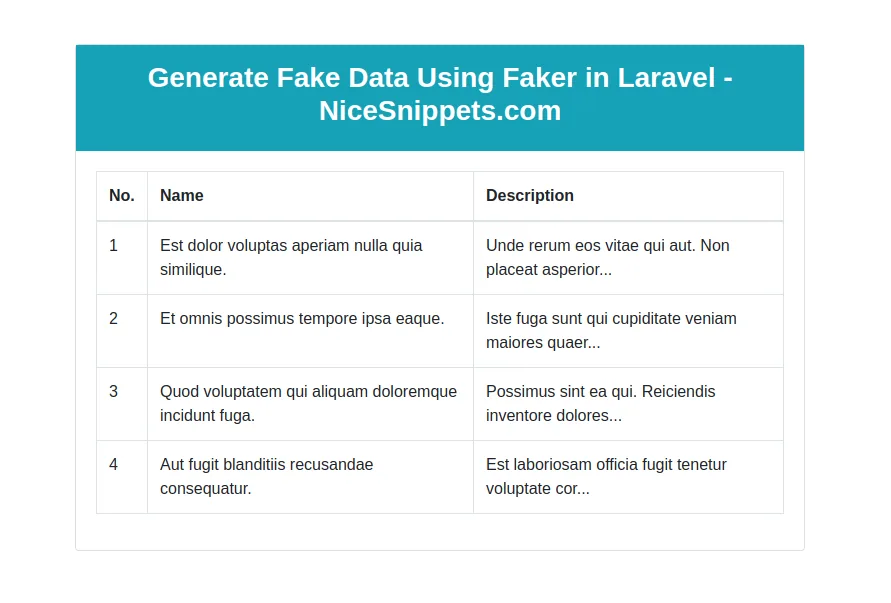
http://localhost:8000/fake-blogTable Preview
It will help you...
- How to Notifications With database Driver in Laravel 11?
- How to Send Email Via Notification in Laravel 11?
- How to Install and Configure Laravel 11 Debugbar?
- How to Like Dislike System in Laravel 11?
- How to Paginate a Model with Relationship in Laravel 11?
- Laravel 11 Upload Files to Amazon S3 Example
- Laravel 11 Send WhatsApp Messages Example
- Laravel 11 Rest API Authentication Using JWT Tutorial