How to Install Froala Editor in Laravel App?
Teams applying “How to Install Froala Editor in Laravel App?” in a production project can use this team workflow page to record implementation, review and debugging time, then compare that effort with tests and shipped functionality instead of treating activity as performance by itself.
Before copying the example into a live application, confirm version-specific behaviour with the official Laravel website and test it against the project’s actual database and runtime.
Aug 31, 2022
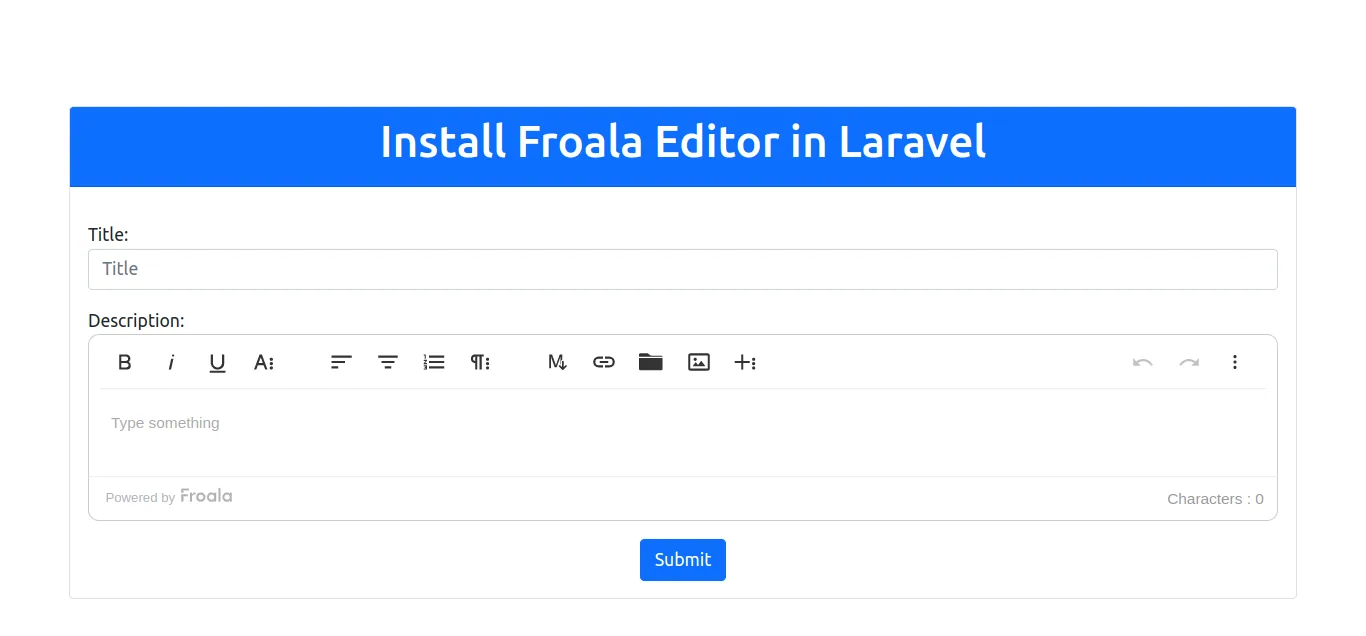
Hello Friends,
In this article we will cover on how to implement how to install froala editor in laravel app?. you will learn froala editor laravel. In this article, we will implement a install froala editor in laravel. I would like to show you laravel froala editor example tutorial. Follow bellow tutorial step of how to use froala editor in laravel.
I am going to use cdn to install froala editor in Laravel. Froala is a beautiful JavaScript web editor that's easy to integrate for developers and your users will simply fall in love with its clean design. From this example, you will learn how to add rich text editor in laravel.
You can use this example with laravel 6, laravel 7, laravel 8 and laravel 9 version.
So let's start with following examples:
Install Laravel
This is optional; however, if you have not created the laravel app, then you may go ahead and execute the below command:
composer create-project laravel/laravel example-apppostCreate.blade.php
resources/views/post/postCreate.blade.php
<!DOCTYPE html>
<html>
<head>
    <meta charset="utf-8">
    <meta name="viewport" content="width=device-width, initial-scale=1">
    <title>How to Install Froala Editor in Laravel App?</title>
    <link href="https://cdn.jsdelivr.net/npm/[email protected]/dist/css/bootstrap.min.css" rel="stylesheet" integrity="sha384-EVSTQN3/azprG1Anm3QDgpJLIm9Nao0Yz1ztcQTwFspd3yD65VohhpuuCOmLASjC" crossorigin="anonymous">
    <link rel="stylesheet" href="https://cdnjs.cloudflare.com/ajax/libs/froala-editor/4.0.13/css/froala_editor.pkgd.min.css">
</head>
<body>
    <div class="container">
        <div class="row mt-5 pt-5">
            <div class="col-md-12">
                <div class="card">
                    <div class="card-header bg-primary text-white">
                        <h1 class="text-center">How to Install Froala Editor in Laravel App?</h1>
                    </div>
                    <div class="card-body">
                        <form action="" method="POST">
                            <div class="mt-3">
                                <label>Title:</label>
                                <input type="text" name="title" class="form-control" placeholder="Title">
                            </div>
                            <div class="mt-3">
                                <label>Description:</label>
                                <textarea id="description" name="description" class="form-control" rows="3" placeholder="description" required>{{ isset($post) ? $post->description : ''}}</textarea>
                                <div class="invalid-tooltip">This field is required</div>
                            </div>
                            <div class="text-center mt-3">
                                <button type="submit" class=" btn btn-primary">Submit</button>
                            </div>
                        </form>
                    </div>
                </div>
            </div>
        </div>
    </div>
</body>
<script src="https://cdn.jsdelivr.net/npm/[email protected]/dist/js/bootstrap.min.js" integrity="sha384-cVKIPhGWiC2Al4u+LWgxfKTRIcfu0JTxR+EQDz/bgldoEyl4H0zUF0QKbrJ0EcQF" crossorigin="anonymous"></script>
<script src="https://cdnjs.cloudflare.com/ajax/libs/jquery/3.6.0/jquery.min.js" integrity="sha512-894YE6QWD5I59HgZOGReFYm4dnWc1Qt5NtvYSaNcOP+u1T9qYdvdihz0PPSiiqn/+/3e7Jo4EaG7TubfWGUrMQ==" crossorigin="anonymous" referrerpolicy="no-referrer"></script>
<script src="https://cdnjs.cloudflare.com/ajax/libs/froala-editor/4.0.13/js/froala_editor.pkgd.min.js"></script>
<script>
    $(document).ready(function() {
        var editor = new FroalaEditor('#description');
    });
</script>
</html>
Run Laravel App:
All steps have been done, now you have to type the given command and hit enter to run the laravel app:
php artisan serveNow, you have to open web browser, type the given URL and view the app output:
http://localhost:8000/now it works...
- How to Notifications With database Driver in Laravel 11?
- How to Send Email Via Notification in Laravel 11?
- How to Install and Configure Laravel 11 Debugbar?
- How to Like Dislike System in Laravel 11?
- How to Paginate a Model with Relationship in Laravel 11?
- Laravel 11 Upload Files to Amazon S3 Example
- Laravel 11 Send WhatsApp Messages Example
- Laravel 11 Rest API Authentication Using JWT Tutorial