Laravel digits_between Validation Example
Teams applying “Laravel digits_between Validation Example” in a production project can use the official article to record implementation, review and debugging time, then compare that effort with tests and shipped functionality instead of treating activity as performance by itself.
Before copying the example into a live application, confirm version-specific behaviour with the official Laravel website and test it against the project’s actual database and runtime.
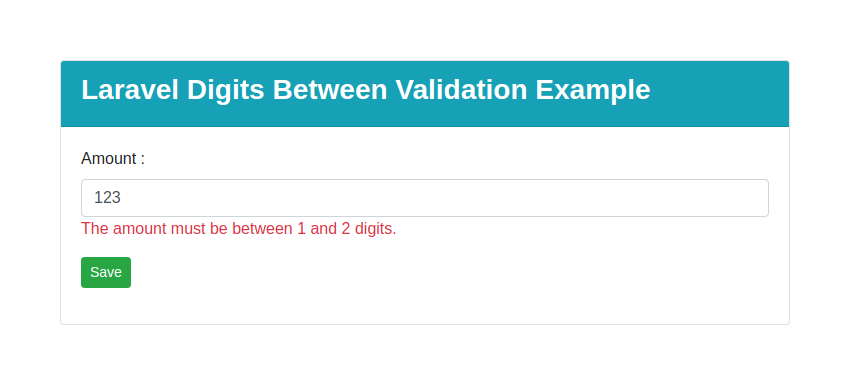
Hi Guys,
In this blog, I will show you how to validate digits between in laravel application. We will use simple use rules of laravel validator i want to check input for between 1 and 10. This article will give you laravel digits between valdation example.
The field under validation must be numeric and must have a length between the given min and max. numeric.
Here, i will show you how to works laravel validation for digits_between. you can see laravel validation digits_between must have a length min and max. This article will give you simple example of digits_between in laravel validation. So, let's follow few step to create example of laravel digits_between Validation Example.
Solution :
$request->validate([
    'amount' => 'required|digits_between:1,2'
]);
Full Example
Add Route
use App\Http\Controllers\ValidationController;
Route::get('digits-between',[ValidationController::class,'digitsBetweenValidation']);
Route::post('store-digits-between',[ValidationController::class,'digitsBetweenStore'])->name('store.digits.between');
Controller : app/Http/Controllers/ValidationController.php
<?php
namespace App\Http\Controllers;
use Illuminate\Http\Request;
class ValidationController extends Controller
{
    public function digitsBetweenValidation()
    {
        return view('validation.digitsBetweenValidation');
    }
    public function digitsBetweenStore(Request $request)
    {
        $request->validate([
            'amount' => 'required|digits_between:1,2',
        ]);
    }
}
View : resources/views/validation/lteValidation.php
<!DOCTYPE html>
<html>
<head>
    <title>Laravel Between Validation Example</title>
    <link rel="stylesheet" href="https://cdnjs.cloudflare.com/ajax/libs/twitter-bootstrap/4.5.3/css/bootstrap.min.css" integrity="sha512-oc9+XSs1H243/FRN9Rw62Fn8EtxjEYWHXRvjS43YtueEewbS6ObfXcJNyohjHqVKFPoXXUxwc+q1K7Dee6vv9g==" crossorigin="anonymous" />
    <script src="https://cdnjs.cloudflare.com/ajax/libs/jquery/3.5.1/jquery.min.js" integrity="sha512-bLT0Qm9VnAYZDflyKcBaQ2gg0hSYNQrJ8RilYldYQ1FxQYoCLtUjuuRuZo+fjqhx/qtq/1itJ0C2ejDxltZVFg==" crossorigin="anonymous"></script>
    <script src="https://cdnjs.cloudflare.com/ajax/libs/twitter-bootstrap/4.5.3/js/bootstrap.min.js" integrity="sha512-8qmis31OQi6hIRgvkht0s6mCOittjMa9GMqtK9hes5iEQBQE/Ca6yGE5FsW36vyipGoWQswBj/QBm2JR086Rkw==" crossorigin="anonymous"></script>
    <link rel="stylesheet" href="https://cdnjs.cloudflare.com/ajax/libs/bootstrap-datepicker/1.9.0/css/bootstrap-datepicker.min.css" integrity="sha512-mSYUmp1HYZDFaVKK//63EcZq4iFWFjxSL+Z3T/aCt4IO9Cejm03q3NKKYN6pFQzY0SBOr8h+eCIAZHPXcpZaNw==" crossorigin="anonymous" />
    <script src="https://cdnjs.cloudflare.com/ajax/libs/bootstrap-datepicker/1.9.0/js/bootstrap-datepicker.min.js" integrity="sha512-T/tUfKSV1bihCnd+MxKD0Hm1uBBroVYBOYSk1knyvQ9VyZJpc/ALb4P0r6ubwVPSGB2GvjeoMAJJImBG12TiaQ==" crossorigin="anonymous"></script>
</head>
<body>
    <div class="container mt-5">
        <div class="row">
            <div class="col-md-8 offset-2 mt-5">
                <div class="card">
                    <div class="card-header bg-info text-white">
                        <h3><strong>Laravel Digits Between Validation Example</strong></h3>
                    </div>
                    <div class="card-body">
                        <form action="{{ route('store.digits.between') }}" method="post">
                            @csrf
                            <div class="form-group">
                                <label>Amount :</label>
                                <input class="form-control" name="amount" value="{{ old('amount') }}">
                                @if($errors->has('amount'))
                                    <span class="text-danger">{{ $errors->first('amount') }}</span>
                                @endif
                            </div>
                            <div class="form-group">
                                <button class="btn btn-success btn-sm">Save</button>
                            </div>
                        </form>
                    </div>
                </div>
            </div>
        </div>
    </div>
</body>
</html>
Run Your Project
Now we are ready to run our example so run bellow command for quick run:
php artisan serveNow you can open bellow URL on your browser:
http://localhost:8000/digits-betweenIt will help you....
- How to Notifications With database Driver in Laravel 11?
- How to Send Email Via Notification in Laravel 11?
- How to Install and Configure Laravel 11 Debugbar?
- How to Like Dislike System in Laravel 11?
- How to Paginate a Model with Relationship in Laravel 11?
- Laravel 11 Upload Files to Amazon S3 Example
- Laravel 11 Send WhatsApp Messages Example
- Laravel 11 Rest API Authentication Using JWT Tutorial