Laravel Livewire Generate Slug Example
Teams applying “Laravel Livewire Generate Slug Example” in a production project can use the product team's article to record implementation, review and debugging time, then compare that effort with tests and shipped functionality instead of treating activity as performance by itself.
Before copying the example into a live application, confirm version-specific behaviour with the official Laravel website and test it against the project’s actual database and runtime.
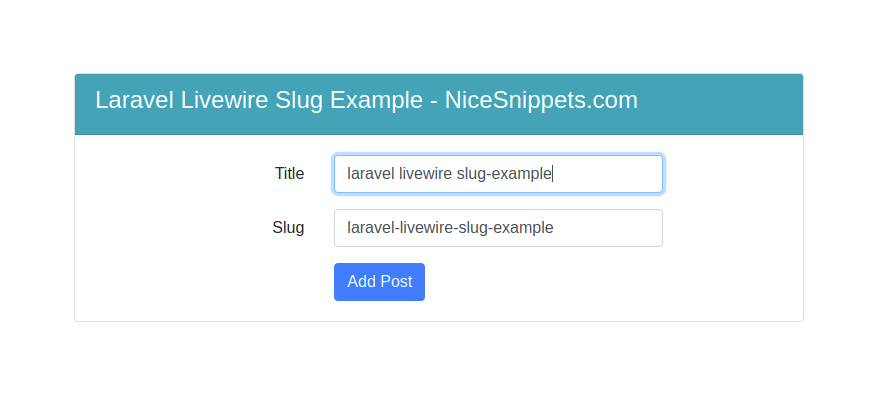
Hello Friends,
In this blog, I would like to share with you how to generate slug in laravel livewire .I will show you a complete example for generate slug example with laravel livewire. We will talk about how to create unique slug in laravel.
Livewire is a full-stack framework for Laravel that makes building dynamic interfaces simple, without leaving the comfort of Laravel.Livewire relies solely on AJAX requests to do all its server communicaton.
Here I will give full example for laravel livewire generate slug example,So Lets follow the bellow step.
Step 1 : Install Laravel App
In First step, We need to get fresh laravel version application using bellow command. So Let's open terminal and run bellow command.
composer create-project --prefer-dist laravel/laravel blogStep 2 : Setup Database Configuration
After successfully install laravel app thenafter configure databse setup. We will open ".env" file and change the database name, username and password in the env file.
DB_CONNECTION=mysql
DB_HOST=127.0.0.1
DB_PORT=3306
DB_DATABASE=Enter_Your_Database_Name
DB_USERNAME=Enter_Your_Database_Username
DB_PASSWORD=Enter_Your_Database_Password
Step 3 : Install Livewire
In this step, You will simply install livewire to our laravel application using bellow command:
composer require livewire/livewireStep 4 : Install "cviebrock/eloquent-sluggable" Package
In this step, You will simply install "cviebrock/eloquent-sluggable" for generate slug to our laravel application using bellow command:
composer require cviebrock/eloquent-sluggableThe package will automatically register its service provider.publish the configuration file if you want to change any defaults using bellow command:
php artisan vendor:publish --provider="Cviebrock\EloquentSluggable\ServiceProvider"Your models should use the Sluggable trait, which has an abstract method sluggable() that you need to define. This is where any model-specific configuration is set (see Configuration below for details):
use Cviebrock\EloquentSluggable\Sluggable;
class Post extends Model
{
    use Sluggable;
    /**
     * Return the sluggable configuration array for this model.
     *
     * @return array
     */
    public function sluggable(): array
    {
        return [
            'slug' => [
                'source' => 'title'
            ]
        ];
    }
}
Step 5 : Create Post Table
In this step, We have to create migration for blogs table using bellow artisan command. So let's open terminal and run bello command :
php artisan make:model Post -mdatabase/migrations/2021_06_05_044246_create_posts_table.php
<?php
use Illuminate\Database\Migrations\Migration;
use Illuminate\Database\Schema\Blueprint;
use Illuminate\Support\Facades\Schema;
class CreatePostsTable extends Migration
{
    /**
     * Run the migrations.
     *
     * @return void
     */
    public function up()
    {
        Schema::create('posts', function (Blueprint $table) {
            $table->id();
            $table->string('title');
            $table->string('slug');
            $table->timestamps();
        });
    }
    /**
     * Reverse the migrations.
     *
     * @return void
     */
    public function down()
    {
        Schema::dropIfExists('posts');
    }
}
App/Models/Post.php
<?php
namespace App\Models;
use Illuminate\Database\Eloquent\Factories\HasFactory;
use Illuminate\Database\Eloquent\Model;
use Cviebrock\EloquentSluggable\Sluggable;
class Post extends Model
{
    use HasFactory,Sluggable;
    protected $fillable = [
        'title','slug'
    ];
    /**
     * Return the sluggable configuration array for this model.
     *
     * @return array
     */
    public function sluggable(): array
    {
        return [
            'slug' => [
                'source' => 'title'
            ]
        ];
    }
}
Step 6 : Create Component
Now, You can create livewire component using bellow command, So Let's run bellow command to create Posts form component:
php artisan make:livewire PostsNow they created fies on both path:
app/Http/Livewire/Posts.php
resources/views/livewire/posts.blade.php
Now first file we will update as bellow for Posts.php file.
app/Http/Livewire/Posts.php
<?php
namespace App\Http\Livewire;
use Livewire\Component;
use \Cviebrock\EloquentSluggable\Services\SlugService;
use App\Models\Post;
class Posts extends Component
{
    public $title;
    public $slug;
    public function render()
    {
        $posts = Post::latest()->take(5)->get();
        return view('livewire.posts', compact('posts'));
    }
    public function updatedTitle()
    {
        $this->slug = SlugService::createSlug(Post::class, 'slug', $this->title);
    }
    public function store()
    {
        Post::create([
            'title' => $this->title,
            'slug'  => $this->slug
        ]);
        $this->title = '';
        $this->slug = '';
    }
}
Step 7 : Add Route now, we need to add route for Show posts and create post in laravel application. so open your "routes/web.php" file and add following route.
routes/web.php
Route::view('posts','livewire.home');Step 8 : Create View
Here, we will create blade file for call modal route. in this file we will use @livewireStyles, @livewireScripts and @livewire('posts'). so let's add it.
resources/views/livewire/home.blade.php
<!DOCTYPE html>
<html>
<head>
    <title></title>
    <script src="{{ asset('js/app.js') }}" defer></script>
    <link href="{{ asset('css/app.css') }}" rel="stylesheet">
    <link rel="stylesheet" href="https://cdnjs.cloudflare.com/ajax/libs/font-awesome/5.15.3/css/all.min.css" integrity="sha512-iBBXm8fW90+nuLcSKlbmrPcLa0OT92xO1BIsZ+ywDWZCvqsWgccV3gFoRBv0z+8dLJgyAHIhR35VZc2oM/gI1w==" crossorigin="anonymous" referrerpolicy="no-referrer" />
    <script src="https://cdnjs.cloudflare.com/ajax/libs/twitter-bootstrap/4.6.0/js/bootstrap.min.js" integrity="sha512-XKa9Hemdy1Ui3KSGgJdgMyYlUg1gM+QhL6cnlyTe2qzMCYm4nAZ1PsVerQzTTXzonUR+dmswHqgJPuwCq1MaAg==" crossorigin="anonymous" referrerpolicy="no-referrer"></script>
    <link rel="stylesheet" href="https://cdnjs.cloudflare.com/ajax/libs/twitter-bootstrap/4.6.0/css/bootstrap.min.css" integrity="sha512-P5MgMn1jBN01asBgU0z60Qk4QxiXo86+wlFahKrsQf37c9cro517WzVSPPV1tDKzhku2iJ2FVgL67wG03SGnNA==" crossorigin="anonymous" referrerpolicy="no-referrer" />
    @livewireStyles
</head>
<body>
    <div class="container mt-5">
        <div class="row justify-content-center mt-5">
            <div class="col-md-8 mt-5">
                <div class="card">
                    <div class="card-header bg-info text-white">
                        <h4>Laravel Livewire Slug Example - NiceSnippets.com</h4>
                    </div>
                    <div class="card-body">
                        @if (session()->has('message'))
                            <div class="alert alert-success">
                                {{ session('message') }}
                            </div>
                        @endif
                        @livewire('posts')
                    </div>
                </div>
            </div>
        </div>
    </div>
    @livewireScripts
</body>
</html>
resources/views/livewire/posts.blade.php
<div>
    <form wire:submit.prevent="store">
        <div class="form-group row">
            <label for="title" class="col-md-2 col-form-label text-md-right">Title</label>
            <div class="col-md-6">
                <input wire:model="title"
                       type="text"
                       class="form-control @error('title') is-invalid @enderror"
                       autofocus>
                @error('title')
                <span class="invalid-feedback" role="alert">
                    <strong>{{ $message }}</strong>
                </span>
                @enderror
            </div>
        </div>
        <div class="form-group row">
            <label for="slug" class="col-md-2 col-form-label text-md-right">Slug</label>
            <div class="col-md-6">
                <input wire:model="slug"
                       type="text"
                       class="form-control @error('slug') is-invalid @enderror">
                @error('slug')
                <span class="invalid-feedback" role="alert">
                    <strong>{{ $message }}</strong>
                </span>
                @enderror
            </div>
        </div>
        <div class="form-group row mb-0">
            <div class="col-md-8 offset-md-4">
                <button type="submit" class="btn btn-primary">
                    Add Post
                </button>
            </div>
        </div>
    </form>
    <table class="table table-bordered mt-2">
        <thead>
            <tr>
                <th>Name</th>
                <th>Slug</th>
            </tr>
        </thead>
        <tbody>
            @if($posts->count())
                @foreach ($posts as $post)
                    <tr>
                        <td>{{ $post->title }}</td>
                        <td>{{ $post->slug }}</td>
                    </tr>
                @endforeach
            @endif
        </tbody>
    </table>
</div>
Now we are ready to run our example so run bellow command for quick run:
php artisan serveNow you can open bellow URL on your browser:
http://localhost:8000/postsIt will help you..
- How to Notifications With database Driver in Laravel 11?
- How to Send Email Via Notification in Laravel 11?
- How to Install and Configure Laravel 11 Debugbar?
- How to Like Dislike System in Laravel 11?
- How to Paginate a Model with Relationship in Laravel 11?
- Laravel 11 Upload Files to Amazon S3 Example
- Laravel 11 Send WhatsApp Messages Example
- Laravel 11 Rest API Authentication Using JWT Tutorial