Laravel Livewire Search With Pagination Example
Teams applying “Laravel Livewire Search With Pagination Example” in a production project can use the implementation notes to record implementation, review and debugging time, then compare that effort with tests and shipped functionality instead of treating activity as performance by itself.
Before copying the example into a live application, confirm version-specific behaviour with the official Laravel website and test it against the project’s actual database and runtime.
Hi Guys,
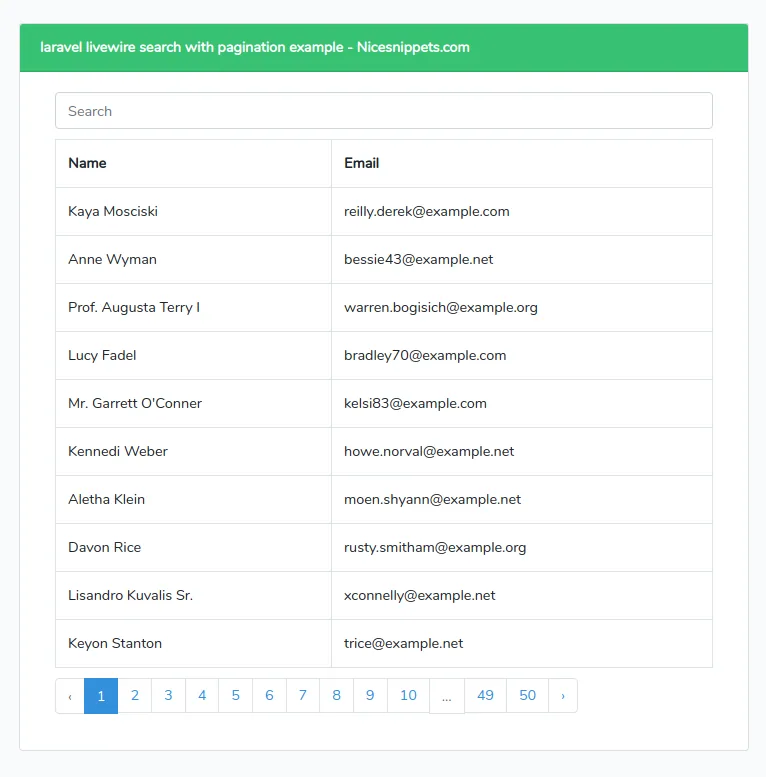
In this tutorial,I will learn you how to create search with pagination livewire laravel.you can easy and simply use search box in livewire laravel.
Step 1 : Install Laravel 7
First step,you can install laravel 7 application.you can below this command in your terminal.
composer create-project --prefer-dist laravel/laravel blogStep 2 : Seed Database
In this step,you can required to many record in search box.then provide to laravel default user factory.add this code databaseeder.php file database/seeds/DatabaseSeeder.php
public function run()
{
    factory(App\User::class,500)->create();
}
Then call php artisan db:seed and you’ll have 500 users add in user table.
Step 3 : Create Component
Now here we will create livewire component using their command. so run bellow command to create contact us form component.
php artisan make:livewire searchNow they created fies on both path:
app/Http/Livewire/Search.php
<?php
namespace App\Http\Livewire;
use Livewire\Component;
use Livewire\WithPagination;
use App\User;
class Search extends Component
{
    use WithPagination;
    public $searchTerm;
    public function render()
    {
        $searchTerm = '%'.$this->searchTerm.'%';
        return view('livewire.search',[
            'users' => User::where('name','like', $searchTerm)->paginate(10)
        ]);
    }
}
resources/views/livewire/search.blade.php
<div class="container">
    <div class="row">
        <div class="col-md-12">


            <input type="text"  class="form-control" placeholder="Search" wire:model="searchTerm" />
            <table class="table table-bordered" style="margin: 10px 0 10px 0;">
                <tr>
                    <th>Name</th>
                    <th>Email</th>
                </tr>
                @foreach($users as $user)
                <tr>
                    <td>
                        {{ $user->name }}
                    </td>
                    <td>
                        {{ $user->email }}
                    </td>
                </tr>
                @endforeach
            </table>
            {{ $users->links() }}
        </div>
    </div>
</div>
Step 4 : Create Route you can create to default blade file route in web.php file.
routes/web.php
Route::get('/search-box', function () {
    return view('searchbox');
});
Step 5 : Create View File you can create blade file for call form route. in this file we will use @livewireStyles, @livewireScripts and @livewire('file-form'). so let's add it.
resources/views/searchbox.blade.php
<!DOCTYPE html>
<html>
<head>
    <title></title>
    @livewireStyles
    <link rel="stylesheet" href="{{ asset('css/app.css') }}">
</head>
<body>
<div class="container mt-4">
    <div class="row">
      <div class="col-md-8 offset-2">
        <div class="card">
          <div class="card-header bg-success text-white ">
            <strong>Search with Laravel Livewire - Nicesnippets.com</strong>
          </div>
          <div class="card-body">
            @livewire('search')
          </div>
        </div>
      </div>
    </div>
</div>
</body>
<script src="{{ asset('js/app.js') }}"></script>
@livewireScripts
</html>
Now you can run using bellow command:
php artisan serveOpen bellow URL:
http://localhost:8000/search-boxIt will help you...
- How to Notifications With database Driver in Laravel 11?
- How to Send Email Via Notification in Laravel 11?
- How to Install and Configure Laravel 11 Debugbar?
- How to Like Dislike System in Laravel 11?
- How to Paginate a Model with Relationship in Laravel 11?
- Laravel 11 Upload Files to Amazon S3 Example
- Laravel 11 Send WhatsApp Messages Example
- Laravel 11 Rest API Authentication Using JWT Tutorial