Laravel Validation Regex Pattern Example
Teams applying “Laravel Validation Regex Pattern Example” in a production project can use tips check if your remote employees productive to record implementation, review and debugging time, then compare that effort with tests and shipped functionality instead of treating activity as performance by itself.
Before copying the example into a live application, confirm version-specific behaviour with the official Laravel website and test it against the project’s actual database and runtime.
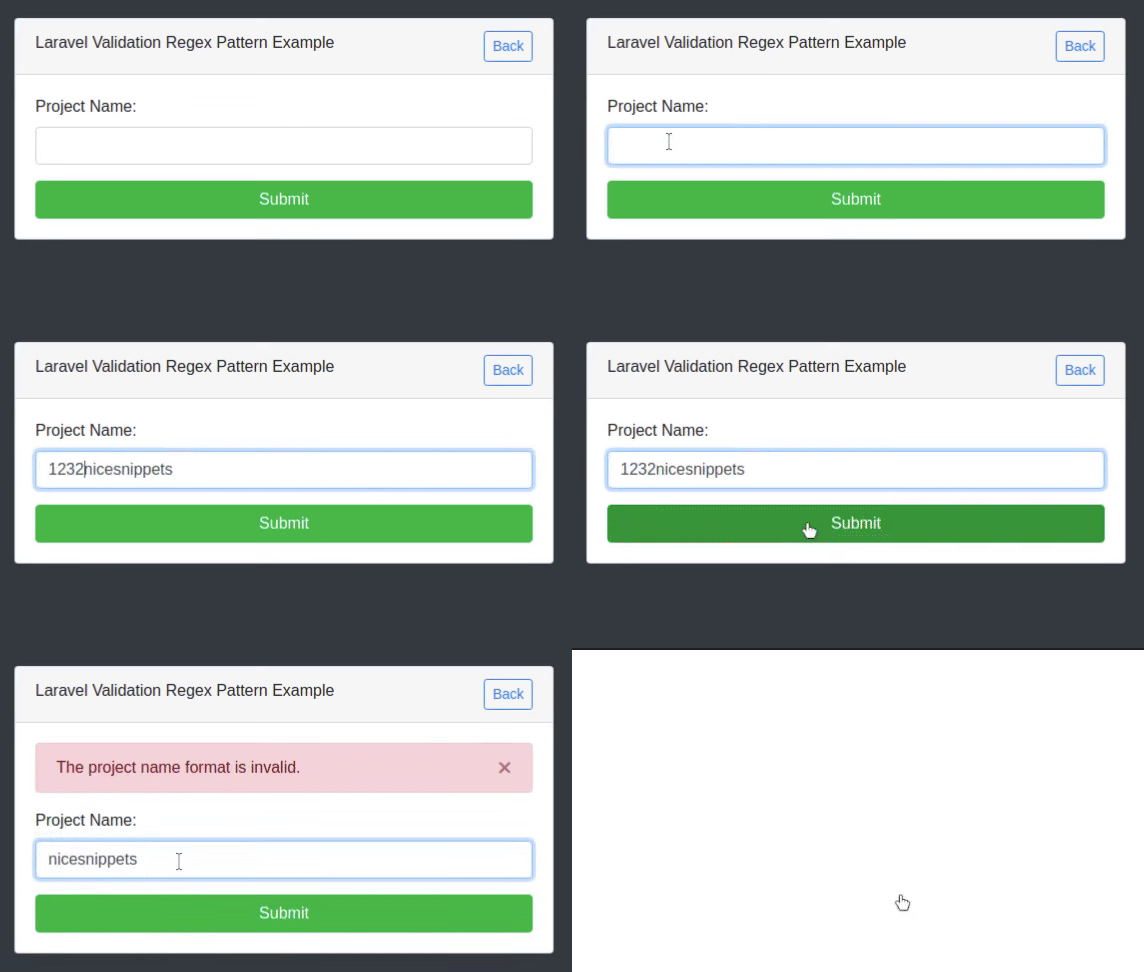
Hi Guys,
Today,I will explain how to validation regex pattern in laravel. you can easy to use validation regex pattern in laravel we are show the regex pattern validation. we will field under validation regex pattern string in laravel
In this example,you can simply apply to validation to regex pattern Validation in laravel. The field under validation must have a regex pattern value.
here the example of laravel validation allow only regex pattern
let see below the solution
solution
$request->validate([
	'project_name' => 'required|regex:/(^([a-zA-z]+)(\d+)?$)/u',
]);
Valid values for project name:
nicesnippets123
nicesnippets
nicesnippets
Invalid values for project name:
123nicesnippets
!nicesnippets
nicesnippets 123
nice snippets
nice snippets123
Route : routes/web.php
Route::get('blogs','BlogController@index');
Route::post('blogs','BlogController@store')->name('blogs.store');
Controller : app/Http/Controllers/BlogController.php
<?php
namespace App\Http\Controllers;
use Illuminate\Http\Request;
use Illuminate\Notifications\Notification;
class BlogController extends Controller
{
    /**
     * Display a listing of the resource.
     *
     * @return \Illuminate\Http\Response
     */
    public function index()
    {
        return view('index');
    }
    /**
     * Store a newly created resource in storage.
     *
     * @param  \Illuminate\Http\Request  $request
     * @return \Illuminate\Http\Response
     */
    public function store(Request $request)
    {
      $request->validate([
        "project_name" => "required|regex pattern"
      ]);
      return redirect()->back();
    }
}
View : resources/views/index.php
<!DOCTYPE html>
<html>
<head>
  <title>From</title>
  <link rel="stylesheet" href="https://cdnjs.cloudflare.com/ajax/libs/twitter-bootstrap/4.5.2/css/bootstrap.min.css" integrity="sha512-MoRNloxbStBcD8z3M/2BmnT+rg4IsMxPkXaGh2zD6LGNNFE80W3onsAhRcMAMrSoyWL9xD7Ert0men7vR8LUZg==" crossorigin="anonymous" />
  <script src="https://ajax.googleapis.com/ajax/libs/jquery/3.5.1/jquery.min.js"></script>
  <script src="https://maxcdn.bootstrapcdn.com/bootstrap/4.5.2/js/bootstrap.min.js"></script>
</head>
<body class="bg-dark">
  <div class="container">
    <div class="row">
      <div class="col-md-6 offset-3">
        <div class="card mt-5">
          <div class="card-header">
            <div class="row">
              <div class="col-md-9">
                 Laravel Validation Regex Pattern Example
              </div>
              <div class="col-md-3 text-right">
                <a href="{{ route('form') }}" class="btn btn-sm btn-outline-primary">Back</a>
              </div>
            </div>
          </div>
          <div class="card-body">
                @if (count($errors) > 0)
                      <div class="row">
                          <div class="col-md-12">
                              <div class="alert alert-danger alert-dismissible">
                                  <button type="button" class="close" data-dismiss="alert" aria-hidden="true">×</button>
                                  @foreach($errors->all() as $error)
                                  {{ $error }} <br>
                                  @endforeach
                              </div>
                          </div>
                      </div>
                    @endif
              <form action="{{ route('from.store') }}" method="post">
                @csrf
                <div class="row">
                  <div class="col-md-12">
                    <div class="form-group">
                      <label>Project Name:</label>
                      <input name="project_name" type="text" class="form-control">
                    </div>
                  </div>
                </div>
                <div class="row">
                  <div class="col-md-12">
                    <button class="btn btn-block btn-success">Submit</button>
                  </div>
                </div>
              </form>
          </div>
        </div>
      </div>
    </div>
  </div>
</body>
</html>
It will help you...
# Laravel 8
# Laravel
- How to Notifications With database Driver in Laravel 11?
- How to Send Email Via Notification in Laravel 11?
- How to Install and Configure Laravel 11 Debugbar?
- How to Like Dislike System in Laravel 11?
- How to Paginate a Model with Relationship in Laravel 11?
- Laravel 11 Upload Files to Amazon S3 Example
- Laravel 11 Send WhatsApp Messages Example
- Laravel 11 Rest API Authentication Using JWT Tutorial