PHP Form Validation Tutorial
Teams applying “PHP Form Validation Tutorial” in a production project can use monitor employees without being overly intrusive still to record implementation, review and debugging time, then compare that effort with tests and shipped functionality instead of treating activity as performance by itself.
Before copying the example into a live application, confirm version-specific behaviour with the PHP project and test it against the project’s actual database and runtime.
Hello Friends,
Now let's see example of form validation tutorial in php. We will show how to create and validate a basic form using PHP and HTML. In this tutorial i am going to learn you how to validate form using PHP. You will learn about how to submit form with validation in php.
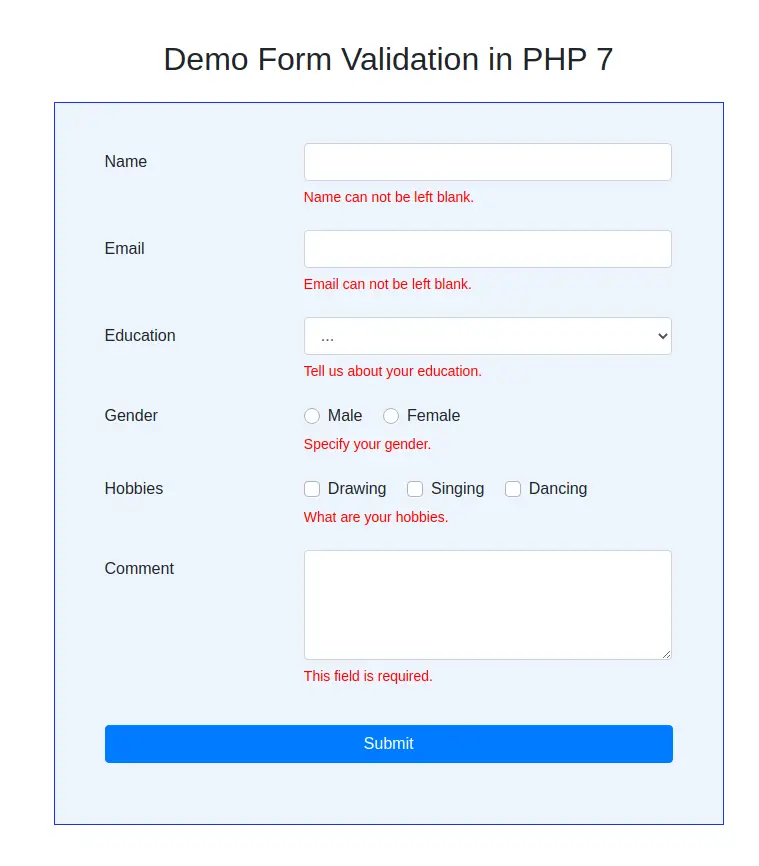
We will create a simple form which will contain various inputs like textbox, checkbox, radio buttons and a submit button. After submitting the form, we will validate the fields with php and show error messages if there are some errors.
Here I will give you full example for php form validation tutorial So let's see bellow example:
index.php
<!doctype html>
<html>
<head>
    <meta charset="utf-8">
    <title>Form Validation in PHP</title>
    <link rel="stylesheet" href="https://stackpath.bootstrapcdn.com/bootstrap/4.5.0/css/bootstrap.min.css">
    <link rel="stylesheet" href="assets/css/style.css">
</head>
<style type="text/css">
    .container {
        max-width: 700px;
        margin: 50px auto;
    }
    form {
        border: 1px solid #1A33FF;
        background: #ecf5fc;
        padding: 40px 50px 45px;
    }
    .form-control:focus {
        border-color: #000;
        box-shadow: none;
    }
    .error {
        color: red;
        font-weight: 400;
        display: block;
        padding: 6px 0;
        font-size: 14px;
    }
    .form-control.error {
        border-color: red;
        padding: .375rem .75rem;
    }
</style>
<body>
    <div class="container mt-5">
        <h2 class="text-center mb-4">Demo Form Validation in PHP 7</h2>
        <!-- Form validation script -->
        <?php include('form_validation.php'); ?>
        <!-- Contact form -->
        <form action="" method="post" novalidate>
            <div class="form-group row">
                <label class="col-sm-4 col-form-label">Name</label>
                    <div class="col-sm-8">
                        <input type="text" name="name" class="form-control">
                        <!-- Error -->
                        <?php echo $nameEmptyErr; ?>
                        <?php echo $nameErr; ?>
                    </div>
            </div>
            <div class="form-group row">
                <label class="col-sm-4 col-form-label">Email</label>
                <div class="col-sm-8">
                    <input type="email" name="email" class="form-control">
                    <!-- Error -->
                    <?php echo $emailEmptyErr; ?>
                    <?php echo $emailErr; ?>
                </div>
            </div>
            <div class="form-group row">
                <label class="col-sm-4 col-form-label">Education</label>
                <div class="col-sm-8">
                    <select id="education" name="education" class="form-control">
                        <option selected="" disabled>...</option>
                        <option value="Graduation">Graduation</option>
                        <option value="Post Graduation">Post Graduation</option>
                    </select>
                    <!-- Error -->
                    <?php echo $educationEmptyErr; ?>
                </div>
            </div>
            <fieldset class="form-group">
                <div class="row">
                    <legend class="col-form-label col-sm-4 pt-0">Gender</legend>
                    <div class="col-sm-8">
                        <div class="custom-control custom-radio custom-control-inline">
                            <input type="radio" id="male" name="gender" value="Male" class="custom-control-input">
                            <label class="custom-control-label" for="male">Male</label>
                        </div>
                        <div class="custom-control custom-radio custom-control-inline">
                            <input type="radio" id="female" name="gender" value="Female" class="custom-control-input">
                            <label class="custom-control-label" for="female">Female</label>
                        </div>
                        <!-- Error -->
                        <?php echo $genderEmptyErr; ?>
                    </div>
                </div>
            </fieldset>
            <div class="form-group row">
                <div class="col-sm-4">Hobbies</div>
                <div class="col-sm-8">
                    <div class="custom-control custom-checkbox custom-control-inline">
                        <input type="checkbox" name="hoby[]" value="Drawing" class="custom-control-input" id="drawing">
                        <label class="custom-control-label" for="drawing">Drawing</label>
                    </div>
                    <div class="custom-control custom-checkbox custom-control-inline">
                        <input type="checkbox" name="hoby[]" value="Singing" class="custom-control-input" id="singing">
                        <label class="custom-control-label" for="singing">Singing</label>
                    </div>
                    <div class="custom-control custom-checkbox custom-control-inline">
                        <input type="checkbox" name="hoby[]" value="Dancing" class="custom-control-input" id="dancing">
                        <label class="custom-control-label" for="dancing">Dancing</label>
                    </div>
                    <!-- Error -->
                    <?php echo $hobyEmptyErr; ?>
                </div>
            </div>
            <div class="form-group row">
                <label class="col-sm-4 col-form-label">Comment</label>
                <div class="col-sm-8">
                    <textarea class="form-control" name="comment" id="comment" rows="4"></textarea>
                    <!-- Error -->
                    <?php echo $commentEmptyErr; ?>
                </div>
            </div>
            <div class="form-group row">
                <div class="col-sm-12 mt-3">
                    <button type="submit" name="submit" class="btn btn-primary btn-block">Submit</button>
                </div>
            </div>
        </form>
    </div>
</body>
</html>
form_validation.php
<?php


    // Error messages
    $nameEmptyErr = "";
    $emailEmptyErr = "";
    $educationEmptyErr = "";
    $genderEmptyErr = "";
    $hobyEmptyErr = "";
    $commentEmptyErr = "";
    $nameErr = "";
    $emailErr = "";
    if(isset($_POST["submit"])) {
        // Set form variables
        $name           = checkInput($_POST["name"]);
        $email          = checkInput($_POST["email"]);
        if (!empty($_POST["education"])) {
            $education      = checkInput($_POST["education"]);
        }
        if (!empty($_POST["gender"])) {
            $gender         = checkInput($_POST["gender"]);
        }
        if (!empty($_POST["hoby"])) {
            $hoby           = $_POST["hoby"];
        }
        $comment        = checkInput($_POST["comment"]);
        // Name validation
        if(empty($name)){
            $nameEmptyErr = '<div class="error">Name can not be left blank.</div>';
        } // Allow letters and white space
        else if(!preg_match("/^[a-zA-Z ]*$/", $name)) {
            $nameErr = '<div class="error">Only letters and white space allowed.</div>';
        } else {
            echo $name . '<br>';
        }
        // Email validation
        if(empty($email)){
            $emailEmptyErr = '<div class="error">Email can not be left blank.</div>';
        } // E-mail format validation
        else if (!preg_match("/^([a-z0-9\+_\-]+)(\.[a-z0-9\+_\-]+)*@([a-z0-9\-]+\.)+[a-z]{2,6}$/ix", $email)){
            $emailErr = '<div class="error">Email format is not valid.</div>';
        } else {
            echo $email . '<br>';
        }
        # code...
        // Select option validation
        if(empty($education)){
            $educationEmptyErr = '<div class="error">Tell us about your education.</div>';
        } else {
            echo $education . '<br>';
        }
        // Radio button validation
        if(empty($gender)){
            $genderEmptyErr = '<div class="error">Specify your gender.</div>';
        } else {
            echo $gender . '<br>';
        }
        // Checkbox validation
        if(!empty($hoby)){
            foreach($_POST['hoby'] as $val){
                echo $val . '<br>';
            }
        } else {
            $hobyEmptyErr = '<div class="error">What are your hobbies.</div>';
        }
        // Text-area validation
        if(empty($comment)){
            $commentEmptyErr = '<div class="error">This field is required.</div>';
        } else {
            echo $comment . '<br>';
        }
    }
    function checkInput($input) {
        $input = trim($input);
        $input = stripslashes($input);
        $input = htmlspecialchars($input);
        return $input;
    }
?>
It will help you....
- How To Use Php Conditional Statement Example
- How to Check if String Contains Regex in PHP?
- PHP Array_column() Function Example
- PHP Generate List of Random Numbers Between 0 and 100 Example
- How to User Login with Facebook in PHP?
- How to Explode Every Character into Array Using PHP Example?
- PHP Convert XML to JSON Example
- How To Add Year To Current Date In Php?