How to Make a Nice "time picker" in PHP?
Teams applying “How to Make a Nice "time picker" in PHP?” in a production project can use quiet quitting to record implementation, review and debugging time, then compare that effort with tests and shipped functionality instead of treating activity as performance by itself.
Before copying the example into a live application, confirm version-specific behaviour with the PHP project and test it against the project’s actual database and runtime.
Hi friends,
In this post, we will learn How to Make a Nice "time picker" in PHP?. i explained simply step by step How To Use Bootstrap timepicker in PHP & MySQL. Here you will learn how to store time picker value to database. This tutorial will give you simple example of timepicker php mysql Code Example.
I will give you simple Example of How to make a nice "time picker" in PHP.
So let's see bellow example:
connection.php
<?php
    $servername = "localhost";
    $username = "root";
    $password = "root";
    $dbname = "aatman";
    $conn = new mysqli($servername,$username,$password,$dbname);
    if($conn->connect_error){
        die ('connection faild:'.$conn->connect_error);
    }
?>
index.php
<?php
    session_start();
    if(isset($_SESSION["msg"]) && !empty($_SESSION["msg"]))
        {
            $msg=$_SESSION["msg"];
            echo $msg;
            unset($_SESSION['msg']);
            session_destroy();
        }
?>
<!DOCTYPE html>
<html>
<head>
    <meta charset="utf-8">
    <meta name="viewport" content="width=device-width, initial-scale=1">
    <link href="https://cdn.jsdelivr.net/npm/[email protected]/dist/css/bootstrap.min.css" rel="stylesheet">
    <link rel="stylesheet" type="text/css" href="https://cdnjs.cloudflare.com/ajax/libs/font-awesome/4.7.0/css/font-awesome.min.css">
    <title>How to Make a Nice "time picker" in PHP?</title>
    <style type="text/css">
        .error
        {
            color: red;
        }
    </style>
</head>
<body class="bg-dark">
    <div class="container mt-5">
        <?php
            $error = $_SESSION['errors'];
            extract($error);
            session_destroy();
        ?>
        <div class="card">
            <div class="card-header">
                <h1 class="text-center">How to Make a Nice "time picker" in PHP?</h1>
            </div>
            <div class="card-body">
                <form action="process.php" method="post">


                    <div class="row my-2">
                        <div class="col-md-6">
                            <label for="fname">First Name :</label>
                            <span class="error">*</span>
                            <input type="text" name="first_name" id="first_name" class="form-control" placeholder="Please Enter First Name">
                            <span class="error"><?php echo $first_nameErr;?></span>
                        </div>
                        <div class="col-md-6">
                            <label for="lname">Last Name :</label>
                            <span class="error">*</span>
                            <input type="text" name="last_name" id="last_name" class="form-control" placeholder="Please Enter Last Name">
                            <span class="error"><?php echo $last_nameErr; ?></span>
                        </div>
                    </div>


                    <div class="row my-2">
                        <div class="col-md-6">
                            <label for="email">Email :</label>
                            <input type="email" name="email" id="email" class="form-control" placeholder="Please Enter email">
                        </div>
                        <div class="col-md-6">
                            <label for="ragistration_time">Ragistration Time :</label>
                            <span class="error">*</span><br>
                            <input type="time" name="ragistration_time" id="ragistration_time" class="form-control">
                            <span class="error"><?php echo $ragistration_timeErr;?></span>
                        </div>
                    </div>


                    <div class="row my-2">
                        <div class="col-md-12">
                            <label for="address">Address :</label>
                            <span class="error">*</span><br>
                            <textarea name="address" id="address" rows="6" cols="40" class="form-control" placeholder="Please Enter address"></textarea>
                            <span class="error"><?php echo $addressErr;?></span>
                        </div>
                    </div>
            </div>
            <div class="card-footer text-center">
                <input type="submit" name="save" class="btn btn-primary">
                </form>
            </div>
        </div>
    </div>
</body>
</html>
process.php
<?php
    session_start();
    if ($_SERVER["REQUEST_METHOD"] == "POST") {
    extract($_POST);
    $error = array();
        if (empty($first_name)) {
            $error['first_nameErr'] = "first name is required!";
        }
        if (empty($last_name)) {
            $error['last_nameErr'] = "last name is required!";
        }
        if (empty($ragistration_time)) {
            $error['ragistration_timeErr'] = "ragistration time is required!";
        }
        if (!empty($error)) {
            $_SESSION['errors'] = $error;
            header('location:index.php');
        }
        if (empty($error)){


            include "connection.php";


            $sql = "INSERT INTO students (first_name,last_name,email,address,ragistration)
                    VALUES('$first_name','$last_name','$email','$address','$ragistration_time')";
            if ($conn->query($sql)===TRUE) {
                $_SESSION['msg'] = "<div class='alert alert-success' role='alert'>Data Insert Successfully</div>";
                header('location:index.php');
            }else{
                $_SESSION['msg'] = "<div class='alert alert-danger' role='alert'>Error: ".$sql."<br>".$conn->error."</div>";
                header('location:index.php');
            }
            $conn->close();
        }else{
            header('location:index.php');
        }
    }
?>
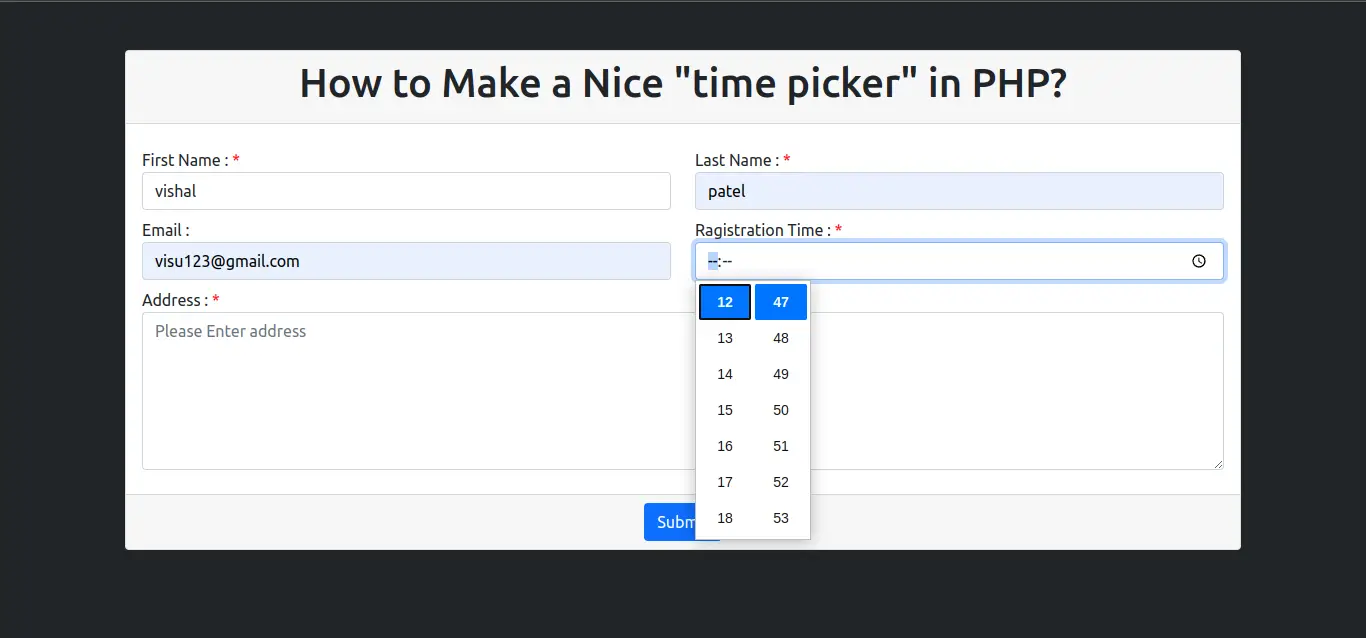
Output:
I hope it will help you....
- How To Use Php Conditional Statement Example
- How to Check if String Contains Regex in PHP?
- PHP Array_column() Function Example
- PHP Generate List of Random Numbers Between 0 and 100 Example
- How to User Login with Facebook in PHP?
- How to Explode Every Character into Array Using PHP Example?
- PHP Form Validation Tutorial
- PHP Convert XML to JSON Example