React Bootstrap Navbar Example
When “React Bootstrap Navbar Example” moves through design, development and browser testing, top time blocking apps can clarify hand-offs and time spent on revisions while leaving code quality, accessibility and released behaviour as the real measures of success.
For API changes, browser support and current usage patterns, compare the snippet with Bootstrap before adopting it in production.
Mar 17, 2020
Hello Guys,
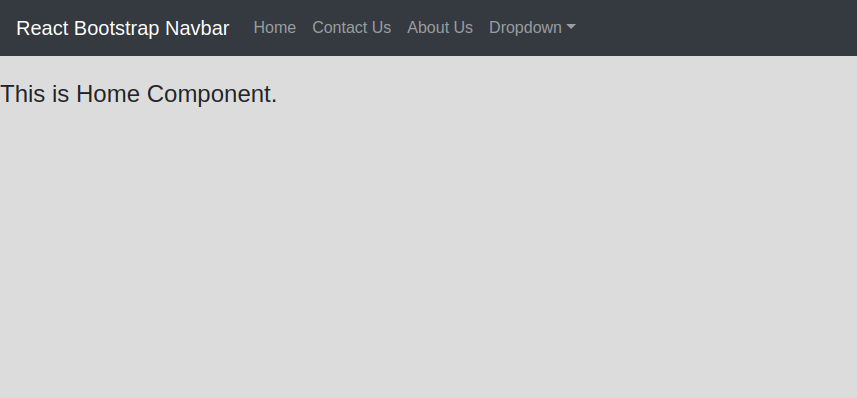
In this tutorial, i will show you react bootstrap navbar component. i would like to share with you react bootstrap navbar always on top navbar with react router. In this article, we will implement a react bootstrap navbar button. it's simple example of react bootstrap navbar bg color. Here, Creating a basic example of react js navbar dropdown.
If you are start react js learning then we are provide you best artical. you have to use bootstrap navbar first import from "react-bootstrap". navbar stick on top then you can use sticky="top". also you can change navbar background color using "bg" attribute.
In this navbar you have to set you route path in "href" attribute. no need to define "link" tag.
Install Bootstrap Command
npm install react-bootstrap bootstrapthen import bootstrap in index.js "bootstrap/dist/css/bootstrap.min.css".
/src/BootstrapNavbar.js file
import React from 'react'
import {
    BrowserRouter as Router,
    Switch,
    Route,
    useParams,
  } from "react-router-dom";
  import { Navbar,Nav,NavDropdown,Form,FormControl,Button } from 'react-bootstrap'
  import Home from './Home';
  import AboutUs from './AboutUs';
  import ContactUs from './ContactUs';
class BootstrapNavbar extends React.Component{
    render(){
        return(
            <div>
                <div className="row">
                    <div className="col-md-12">
                        <Router>
                            <Navbar bg="dark" variant="dark" expand="lg" sticky="top">
                                <Navbar.Brand href="#home">React Bootstrap Navbar</Navbar.Brand>
                                <Navbar.Toggle aria-controls="basic-navbar-nav" />
                                <Navbar.Collapse id="basic-navbar-nav">
                                    <Nav className="mr-auto">
                                    <Nav.Link href="/">Home</Nav.Link>
                                    <Nav.Link href="/about-us">Contact Us</Nav.Link>
                                    <Nav.Link href="/contact-us">About Us</Nav.Link>
                                    <NavDropdown title="Dropdown" id="basic-nav-dropdown">
                                        <NavDropdown.Item href="#action/3.1">Action</NavDropdown.Item>
                                        <NavDropdown.Item href="#action/3.2">Another action</NavDropdown.Item>
                                        <NavDropdown.Item href="#action/3.3">Something</NavDropdown.Item>
                                        <NavDropdown.Divider />
                                        <NavDropdown.Item href="#action/3.4">Separated link</NavDropdown.Item>
                                    </NavDropdown>
                                    </Nav>
                                    <Form inline>
                                    <FormControl type="text" placeholder="Search" className="mr-sm-2" />
                                    <Button variant="outline-success">Search</Button>
                                    </Form>
                                </Navbar.Collapse>
                            </Navbar>
                            <br />
                            <Switch>
                                <Route exact path="/">
                                    <Home />
                                </Route>
                                <Route path="/about-us">
                                    <AboutUs />
                                </Route>
                                <Route path="/contact-us">
                                    <ContactUs />
                                </Route>
                            </Switch>
                        </Router>
                    </div>
                </div>
            </div>
        )
    }
}
export default BootstrapNavbar;- How to Reactive Forms with Validation in Angular 18?
- Reactjs Props Example With Function and Class Components
- React Color Picker Example With Change Event
- How to Hide and Show Multiple Div in React ?
- React js File Upload Example With Axios
- How to Resize, Crop, Compress Images Before Uploading In ReactJS?
- How to Send Data From React to Node JS Express?
- Reactjs String Replace Example